Codeable Crafts Review (2026): Real Testing, Real Verdict
In today’s digital age, every parent faces the same haunting question: “Is all screen time inherently harmful?” We have all witnessed that phase where children spend hours lost in mindless YouTube clips or repetitive games. However, at n4gm.com, our mission is to identify tools that transform screen time from “Waste” to “Skill.”
If your child is even younger (ages 3–4), start with our Code Karts review first — it builds the sequencing foundation that Codeable Crafts then expands into storytelling.
The “Why” Behind This Review
We didn’t just read a marketing brochure; we tested Codeable Crafts with real kids in real-world scenarios. We wanted to see if this app truly teaches coding or if it’s just another digital drawing board. During our testing, we observed children aged 5–8 using the app in focused 15–20 minute sessions to gauge its actual impact.
Can you solve this AI Logic Puzzle?
“A robot needs to sort 100 blue balls and 100 red balls. What is the most efficient way to teach it the difference?”
The Logic: Training Data & Pattern Recognition. By showing the AI examples, it learns to classify.
The Secret Sauce: Storytelling & Visualization
The standout feature of this app isn’t just the coding—it’s the Storytelling framework. Early learning experts suggest that when children imagine an action before executing it, they develop a habit of “thinking in steps.” This is the fundamental building block of computational thinking.
- Next-Step Visualization: When a child draws a character, they don’t just stop there. Codeable Crafts nudges them to think: “What will this character do next?”
- Creativity at Scale: The app helps children visualize their “Next Step.” They aren’t just creating a static image; they are planning an entire sequence, which is the first true step toward logical thinking.
Quick Verdict (For the Busy Parent)
If your child is between 5 and 8 years old and you want to introduce the “C” of Coding without the boredom, Codeable Crafts is an excellent entry point. It might not turn them into a software engineer overnight, but it will certainly turn them into a Storyteller and a Visualizer.
What is your Priority for your child’s first step?
Every child is unique. Choose the path that aligns with their personality:
Do you have a different approach?
Share Your Opinion BelowNote: It is important to remember that Codeable Crafts is a starting point, not a complete coding curriculum.
First Impressions & Setup: The “No-Nonsense” Start
While most review sites focus on technical specs, at N4GM, we test apps in real-world environments. For a parent, the first priority is always: “Do I have to manage another 50 accounts just to start?”
🛠️ Installation: A Parent’s Dream
Setting up Codeable Crafts is incredibly refreshing. Whether you are on Android or iPad, the app is ready-to-go the moment it’s installed.
No Login Headache
The best part? There is zero requirement for sign-ups or email IDs. Just download and dive in.
Trust Booster
Zero aggressive pop-ups or ads. A rare “Safe Space” that immediately wins a parent’s trust.
Can a 6-Year-Old Fly Solo?
During our testing, we observed that a 6-year-old required only about 60 seconds of adult guidance—just enough to understand how to switch from the “Drawing” canvas to the “Coding” screen.
Self-Reliance: After that initial minute, the child was completely independent.
The “Vibe”: The interface is bright, cheerful, and intuitive. The icons are so user-friendly that a child doesn’t even need to be a fluent reader; they understand the symbols instinctively.
Sound Check: A bonus for parents—the sound effects aren’t loud or irritating. It maintains a gentle, creative atmosphere in the background.
“Most free kids’ apps focus on data collection and ad revenue. Codeable Crafts’ simple, no-login setup and offline usability make it the gold standard for parents who prioritize digital privacy.”
Feature Deep Dive: Where Creativity Meets Logic
While most reviews label this simply as a “coding app,” we at N4GM discovered it is much more. It serves as a bridge between Art, Logic, and Voice in a child’s mind.
1. Drawing + Templates: Creativity Without Pressure
Codeable Crafts doesn’t intimidate a child with a blank canvas.
The Starting Spark: It features a delightful collection of stickers and templates, allowing children to choose a character instantly.
Character Ownership: When a child colors a template and adds stickers, it becomes “their” character.
The Transition: This is where the magic happens—the child isn’t just making a picture; they are preparing an “Actor” that they will bring to life in the next step.
2. Coding Blocks: The “Building Blocks” of Logic
While sites like Common Sense call it “simple,” we prefer the term “Foundational.” For children, coding isn’t about syntax; it’s about Logic.
3. Story & Narration: The Silent Skill Builder
This feature is the app’s “Unsung Hero.”
| Feature | Codeable Crafts | Standard Coding Apps |
|---|---|---|
| Complexity | Very Low (Perfect for Starters) | High (Often Overwhelming) |
| Focus | Storytelling & Art | Math & Logic |
| Narration | Yes (Voice Record) | No (Text Only) |
| Price | 100% Free | Subscription/Ads |
What We LOVED vs. What HIT the LIMIT (Honest Pros & Cons)
No app is perfect, and Codeable Crafts is no exception. As parents and tech reviewers, we have scrutinized both its strengths and its shortcomings.
🚀 Pros: Why It’s a Must-Have
100% Free (Zero Hidden Costs): There are no In-App Purchases (IAP) and zero annoying ads. In an era where children often accidentally hit “Buy” buttons, this app is a safe haven.
Offline Usability: Whether you are on a flight or in a zone with no network, Codeable Crafts works perfectly without the internet, making it an ideal travel-friendly companion.
Active Creation > Passive Watching: Most children simply “consume” content on tablets (YouTube/Cartoons). This app shifts them into “Creator” mode. They aren’t just watching a screen; they are controlling it.
🛑 Cons: The Honest Reality Check
Limited Assets (The Repetition Gap): The collection of stickers and templates feels vast at first, but after 1-2 weeks of heavy use, a child might get bored with the same characters. New asset updates are rare.
No Cloud Sync: This is a significant drawback. If your child starts a project on an iPad and you switch them to an Android phone, their work stays on the old device. Changing devices means the project is lost.
Lack of Guided Challenges: There are no “Level 1” or “Level 2” missions within the app. Children have to decide what to do themselves. While some enjoy this freedom, others might get stuck wondering, “What should I do next?”
Educational Value: The Hidden Lessons (Teacher & Parent Angle)
At N4GM, we believe every “Game” hides a lesson. Codeable Crafts goes beyond just drawing; it re-wires a child’s brain for Logical Thinking.
Problem Solving & The Art of “Debugging”
In the world of programming, the most vital skill is ‘Debugging’ (finding and fixing errors). In this app, a child learns this naturally:
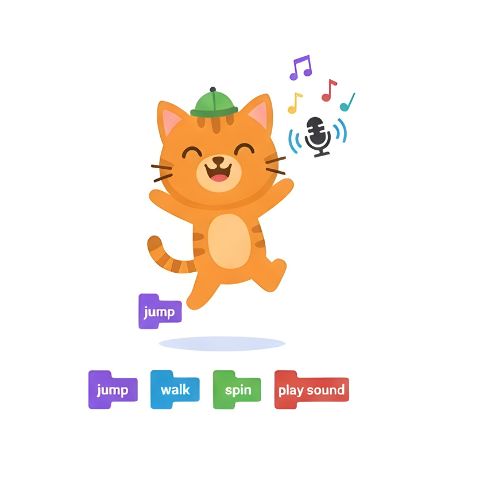
The Error Loop: If a child places a “Jump” block before “Walk” but intended for the character to move first, the animation will play out incorrectly.
Trial & Error: When the child sees the “incorrect” animation, they don’t get frustrated; instead, they reshuffle the blocks. Without a teacher, the child is learning the core essence of coding: “How to fix a mistake.” This early debugging habit is a massive asset for future complex coding.
Motor Skills & Hand-Eye Coordination
In the digital age, fine motor skills are often neglected, but Codeable Crafts brings them back into focus:
Digital Drawing Coloring templates and drawing lines refines a child’s finger movements.
Precise Drag & Drop Snapping coding blocks into the correct sequence and arranging them on screen boosts Eye-Hand Synchronization.
The Visualization Bridge As mentioned earlier, when a child drags and drops on the screen, their brain is already pre-visualizing the outcome: “When I release this here, my character will go there.”
Mini Comparison: Codeable Crafts vs. ScratchJr
While ScratchJr is considered the ‘King’ of kids’ coding, our testing at N4GM revealed that Codeable Crafts takes the lead for children who are “Art-First.”
| Feature | Codeable Crafts | ScratchJr |
|---|---|---|
| Ease for Beginners | ⭐⭐⭐⭐⭐ (Super Simple) |
⭐⭐⭐⭐ (Needs little help) |
| Coding Depth | ⭐⭐⭐ (Basic logic) |
⭐⭐⭐⭐ (Loops & Events) |
| Creativity Focus | ⭐⭐⭐⭐⭐ (Drawing & Story) |
⭐⭐⭐ (Template based) |
| Best For Age | 5–8 Years | 6–9 Years |
| Project Sharing | ❌ Offline only | ✅ Via Email/Airdrop |
| Learning Curve | Zero (Install & Play) |
Minor (Needs to learn icons) |
The Verdict: Which one should you choose?
Choose ScratchJr:
If your child is slightly older and you want to gradually introduce “Proper Coding Logic” like loops and triggers.
Our Advice: “Start with Codeable Crafts to help your child master visualization and storytelling, then ‘Upgrade’ them to ScratchJr once they are ready for more complexity.”
When your child is ready to move from creative drawing to goal-oriented coding puzzles, see our codeSpark Academy review — the next structured level up.
Troubleshooting & Parent Power Tips (The N4GM Secret Sauce)
Most reviews stop at installation, but at N4GM, we’ve crafted a “Survival Guide” for you. Since the in-app help section is a bit limited, these field-tested tips will come in handy:
Pro-Tip #1: The “Challenge First” Method
Children can sometimes get overwhelmed by a blank screen. Instead of giving them direct instructions, give them an Open-ended Challenge:
Pro-Tip #2: The Sweet Spot of Screen Time
Codeable Crafts is an intensive creativity tool, not a mindless scroll. Based on our testing:
Pro-Tip #3: Filling the “Help Gap”
If your child gets stuck on a block and can’t find help within the app, keep this N4GM manual in mind:
“While Codeable Crafts lacks extensive in-app help, that is secretly its greatest strength. It forces children to find their own path—which is the true essence of coding.”
Final Verdict: The N4GM Conclusion
After extensive testing, our conclusion is simple: Codeable Crafts deserves a spot on every tablet used by a child. This app is the perfect first step in transforming a child from a mere “Consumer” of technology into a creative “Creator.”
“Codeable Crafts doesn’t just teach coding — it builds a friendship with coding.”
If you want your child to visualize logic and imagination simultaneously, install it today and watch their creativity come to life.
FAQs: Your Questions Answered
Everything you need to know about Codeable Crafts, curated by the N4GM team.
Is Codeable Crafts safe for children?
Answer: Absolutely! During our testing, we found no ads, no external links, and zero in-app purchases. Additionally, the app doesn’t require a login, making it highly secure in terms of data privacy.
Does the app require an internet connection?
Answer: No. Once downloaded, the app works completely offline. It is perfect for travel or locations where the internet connection might be unstable.
Is Codeable Crafts available on Windows or PC?
Answer: Currently, no. This app is specifically designed for tablets (iPad and Android Tablets) because its interface is optimized for touch interactions and creative drawing.
Is it better than ScratchJr for beginners?
Answer: If your child is between 5–7 years old and has never tried coding, Codeable Crafts is the better starting point due to its simplicity and focus on art. ScratchJr is better suited for children who are ready to learn slightly more complex logic.
What’s Your Take, Parents?
Did your child enjoy creating their first digital story? Or are you facing any issues?
👇 Share your thoughts in the comment section below!
We respond to every comment within 24 hours. Let’s build this community together!
Academy Insight
We believe that smarter learning starts with the right tools. Our 28-day program is designed to turn curiosity into mastery.

Sachin Sharma is a Tech AI Writer and Chief Editor at N4GM.com, simplifying how AI is transforming education and smart learning since 2019. With deep SEO expertise, he delivers reliable insights on AI learning tools and EdTech trends, helping students and educators navigate the future of technology.